The Weekly Habit Review: Ten Minutes With Your Stats

The short answer
A weekly review takes ten minutes, always on the same day. You look at your 30-day rate and at the habit that’s furthest behind, reread its notes, then change one single setting for the coming week: a reminder time, the rhythm or the size of the habit. Those ten minutes turn your grid into a decision for the week ahead.
Why checking boxes isn’t enough
A checked box tells you whether the day is done. It doesn’t tell you whether the habit is improving, whether the reminder goes off at the right time, or why Wednesday has been empty for a month. The answers are in data you already have, if you take the time to read it.
Without a look back, a habit that’s stalling keeps stalling. You see the empty box, promise yourself you’ll do better, and next week looks like last week, since nothing about how your days are set up has changed. During the review, you pick one specific setting to change.
A short appointment, same day every week
Pick a slot that already exists: Sunday evening after dinner, Monday morning with your first coffee. Ten minutes is enough, and really keep it to ten: a review that takes an hour gets dropped before the third week.
You can make it a habit of its own in the app, with a goal of once a week and a reminder on Sunday. The article on weekly and monthly goals explains how to set that rhythm so your streak is counted in weeks.
The review follows four steps, in this order: the overview, one habit in detail, the notes, then a decision.
Step 1: the overview
Open the Stats tab in HabitLove. It opens on the Overall page, which brings together all your active habits. There you’ll find your average rate over 30 days, your best habit right now and, further down the page, the 30-day rate of each one. It also shows the number of active habits and the total of your completions for the year.
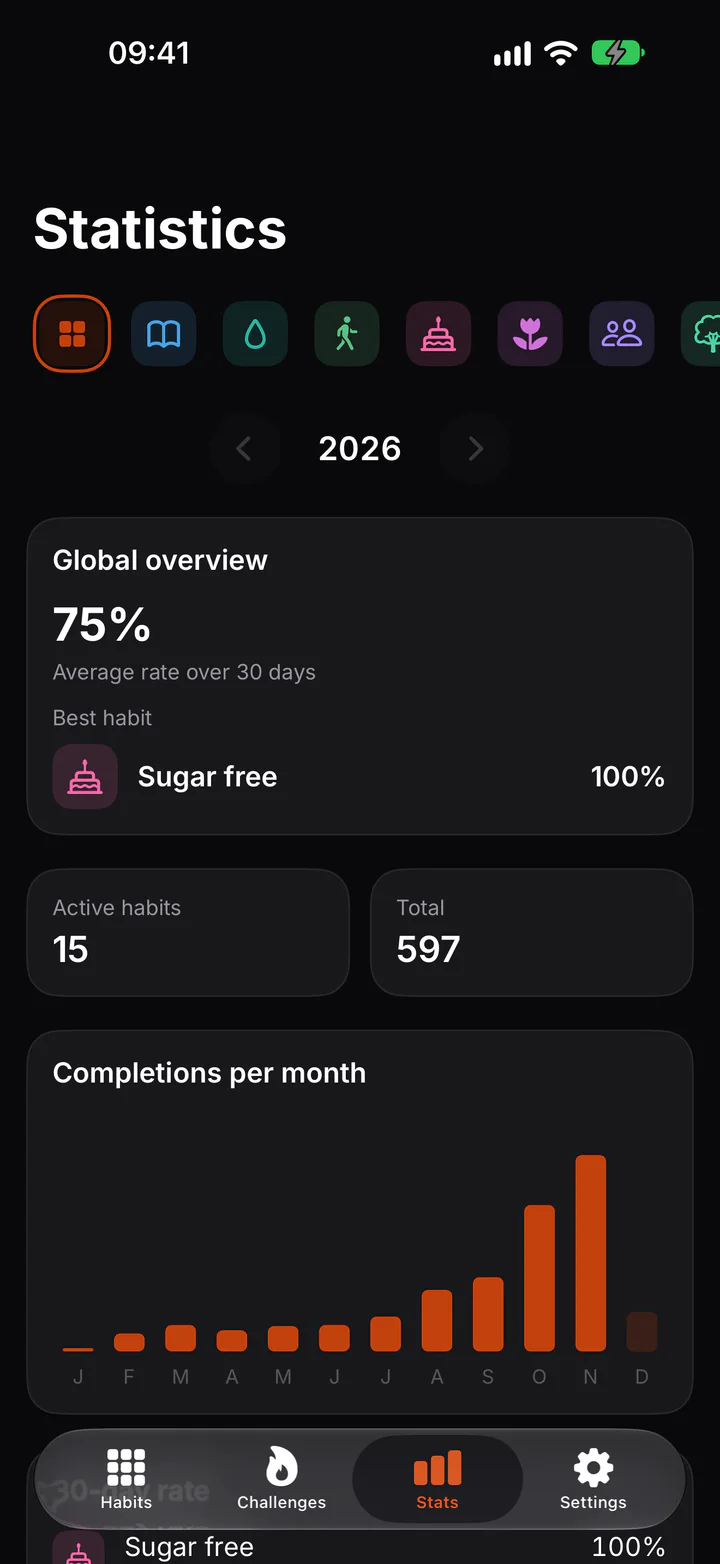
Look at the gap between your habits more than at the average. If four of them get done more than eight days out of ten and one is stuck at one day in three, you know which one to look at tonight. If they’re all low, you’re probably tracking too many at once.
The calculation covers thirty days because a single week is too sensitive: one trip or one cold is enough to sink the number. Over a month, those accidents even out and the trend shows.
Step 2: one habit in detail
From the Overall page, swipe left to move from one habit to the next until you reach the one you’re focusing on tonight. Its page shows its grid for the year, its current streak, its best streak, its success rate and a chart of its completions per month.
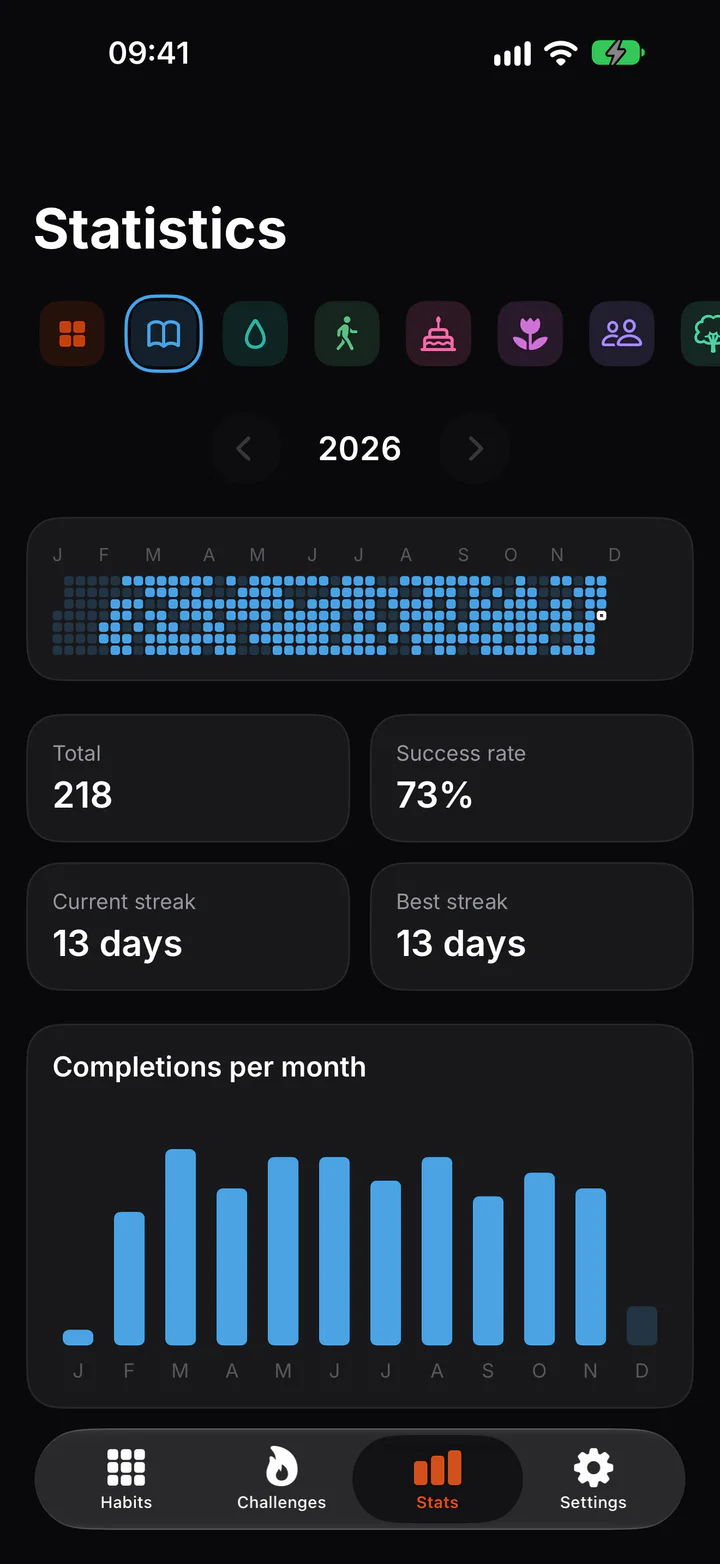
Start with the last four weeks of the grid, and check whether the missed days have something in common. They might fall on the same weekday, come in clusters after a first missed day, or be scattered with no visible logic. Each case calls for a different response, and the grid method explains how to recognize them.
Then look at the monthly chart. It tells you whether November is better than October, which a single week can’t show. A habit can have a mediocre week inside a month that’s clearly on the rise, and in that case there’s nothing to fix.
The streak comes last. It climbs back quickly after a slip and says nothing about the trend, as the article on streaks and slips explains.
Step 3: reread your notes
The numbers tell you which days a habit stalled, and the notes often tell you why. If you’ve gotten into the habit of writing a line on some days (“short session, too tired,” “did it at lunch instead of the evening, much better”), open the habit’s detail screen and reread the week’s notes.
Often, two or three notes reveal the cause. “Too late” three times in ten days, and the problem is the timing. “No gear on hand” twice, and you’re missing some prep the night before.
If you never write notes, start with the hard days. When you open the note field, the app asks two simple questions: “What went well? What got in the way?” One sentence is enough to answer them.
Step 4: one single change
Before you close the app, pick one change for the coming week. With three changes at once, you won’t know which one made a difference.
The options are nearly always the same. You can move the habit to another time of day and shift its reminder earlier or later, or shrink it: twenty pages become ten, eight glasses become six. Its rhythm can go from every day to five times a week. You can also set things up in advance, putting your shoes by the door or the water bottle on your desk.
For a habit that depends on a cue during the day, the reminder is often the right lever. Drinking enough water, for instance, rarely sticks with a single morning reminder. A reminder repeated every hour through the workday works better, as the article on drinking enough water describes.
The last option is archiving. A habit done one day in five for two months, which you no longer feel like defending, clutters your list and reminds you of a failure every day. If you archive it, its history stays intact and you can pick it back up when the time is right.
An example review
Sunday, 8:30 p.m. The Overall page shows a decent average rate. Four habits are going well, but “Run” is clearly behind the others.
On its page, the grid shows that the Saturday runs are almost all done, while the Monday and Wednesday runs are missed one time in two. The notes on the missed days look alike: “left work too late.” The monthly chart is flat, neither up nor down.
The decision for the week: move the weekday runs to the morning, before the shower, and set the reminder to match. Nothing else changes. The whole review took less than ten minutes, and next Sunday you only need to check whether Monday and Wednesday got checked off.
What to avoid
Don’t rebuild your whole system every Sunday. If you change the goals of all your habits at once, your weeks become impossible to compare.
Compare this month with last month, never with an ideal week. A habit done two days out of three, when you used to manage one day in two, has really improved, even if it’s still far from perfect.
Do the review after a bad week too, because that’s when it most clearly gives you something to change.
If your history still lives in another app, you don’t have to start over with an empty grid: the article on switching habit apps without losing your history explains how to import it. And to try the review with your own data, HabitLove is free and needs no account.
Frequently asked questions
When should I do my weekly review?
On the day you already plan the week ahead, often Sunday evening or Monday morning. Above all, keep the same slot, so the review becomes a habit of its own. You can track it in the app, once a week.
How long should it take?
Ten minutes is enough for five or six habits. If it takes longer, you’re looking at too many numbers. Stick to the overview, the weakest habit and one single change.
Which numbers should I look at first?
The 30-day rate of each habit, because it smooths out the accidents of a single week. Then the grid of the habit that’s furthest behind, to see which days are missing. Today’s streak comes last.
What if a habit has lagged for several weeks?
Choose between three options: shrink it, move it to another time, or archive it for now. Keeping it as is and hoping to do better changes nothing from one week to the next. An archived habit keeps its whole history.

Track this habit in HabitLove
One grid per habit, with reminders and streaks. Free, no account needed.