The Habit Grid Method: One Tile a Day

The short answer
The grid method means drawing one square per day and filling it in when the habit is done. After a few weeks, the grid shows your consistency at a glance: the solid stretches, the gaps, the days of the week that give you trouble. It works on paper as well as in an app, as long as you check off each day on the day itself.
One square per day
You draw one square for each day and fill in today’s square when the habit is done. On paper, that’s a calendar you cross off with a marker. In an app, it’s rows of small tiles, one column per week, filling up from left to right.
A plain day counter shows a single number, which drops back to zero the first time you forget. A grid keeps the forty days you did before the miss, the one-day gap, then the days that followed. Your history stays complete, including the weeks when things didn’t go well.
What a grid shows that a list hides
A checklist answers the question “Did I do my habits today?” A grid answers a different one: “What have my last three months looked like?”
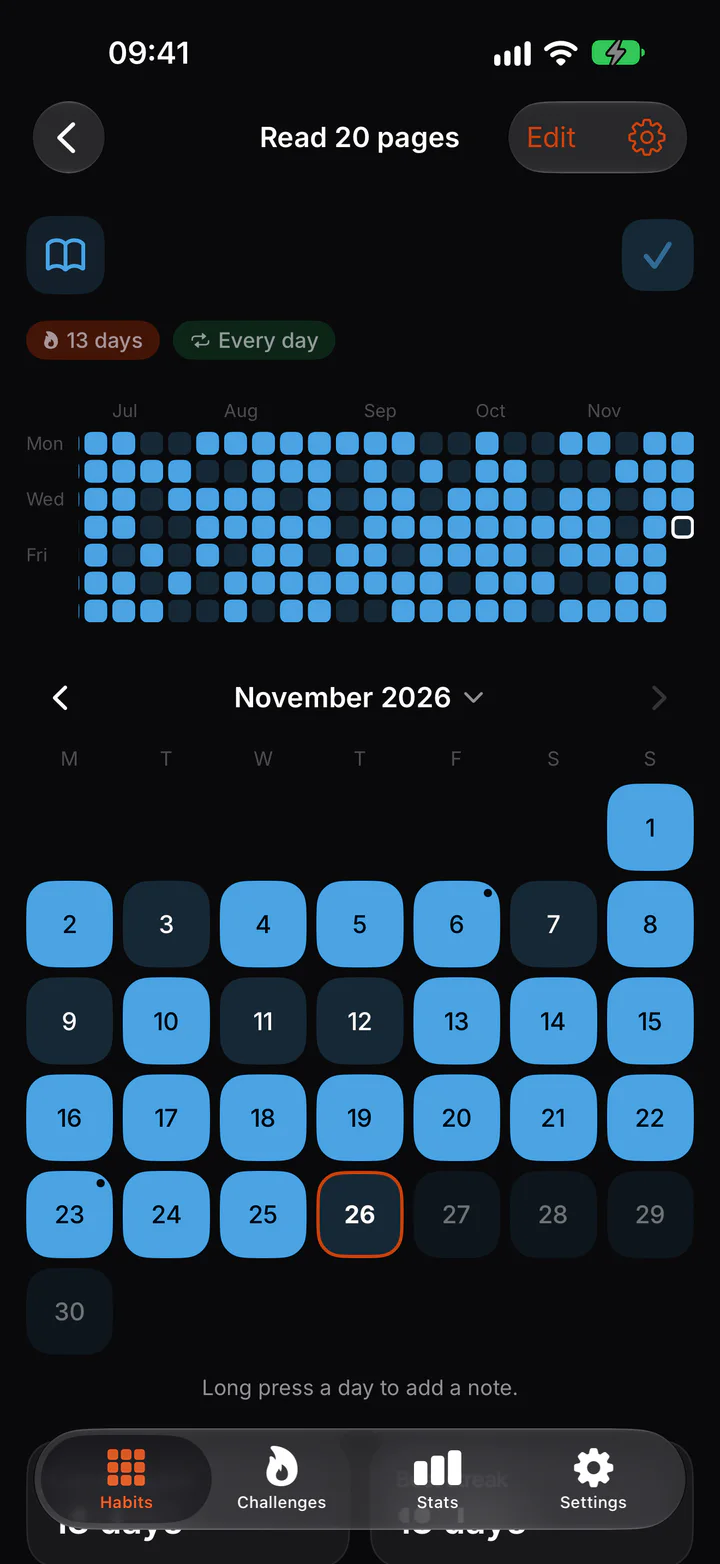
Once the grid covers a few weeks, periods stand out: a solid block in October, a patchy stretch during vacation. The rhythm of the week shows too. Each row is a day of the week, so a row paler than the others jumps out, and you might find that on Thursdays, the night of your late workout, you never read. As for the trend, a grid that grows denser toward the right points to a habit that’s settling in, even if the current streak is short.
A table of numbers holds the same information, but nobody opens a spreadsheet before bed. A grid takes two seconds to read, so you do look at it, even on a tired Thursday night.
How to read your grid
Look at density before you look at the streak. A grid three-quarters full over two months describes a solid habit, whatever today’s streak says. In HabitLove, a habit’s detail screen shows a “30-day rate” next to the current streak and the best streak, and of the three, the rate gives you the clearest picture.
Next, look for patterns. Scattered, random gaps are normal. When they line up on the same row, they point to a day of the week when your schedule leaves no room for the habit. You can move it to another time on that day, or take that day off its schedule.
Finally, look at what happened right before and right after a gap of several days, often a trip, a busy week or a cold. If you wrote a note on those days, you don’t have to guess which. A long press on a day in the grid opens it and lets you add a few words. In the month calendar, a small dot then marks the days that have a note. The article on daily meditation shows how these notes help you understand what helps a session and what gets in its way.
A grid for every kind of habit
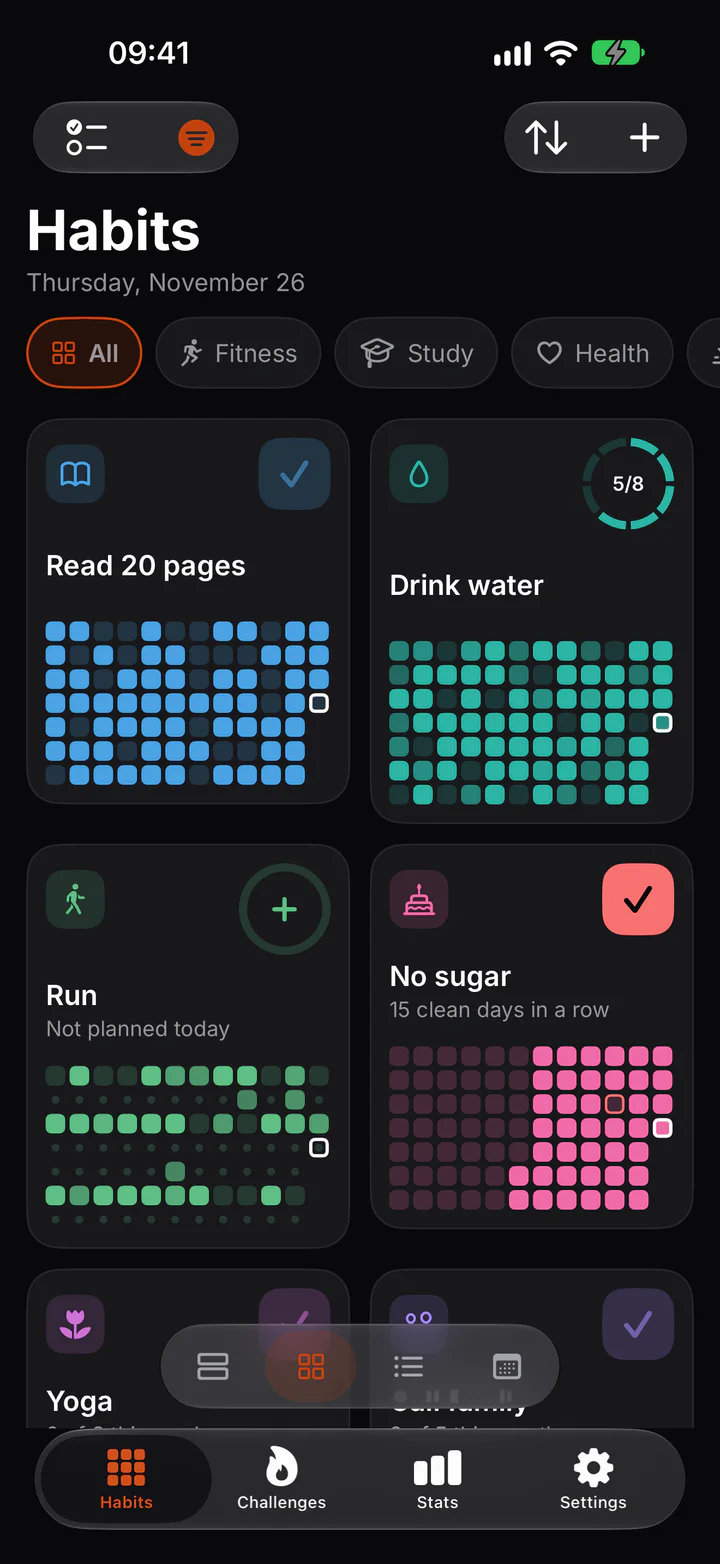
With Yes / No, a tile is either full or empty. With a Counter or a Measure, it fills in by degrees: five glasses of water out of eight give a paler tile than a complete day. You can see the days when you got part of the way, which a plain yes or no would have erased.
When a habit isn’t daily, unscheduled days don’t count as gaps. If you run on Monday, Wednesday and Saturday, the other four days show up as small dots and don’t interrupt your streak.
For a habit to quit, the logic flips. Every day counts as clean by default, and you log only your slips. The grid fills itself in for as long as you hold out, and a slip leaves a visible mark instead of a blank.
Paper or app
A sheet taped to the fridge is visible without opening anything, and there’s nothing to install. Crossing off a square with a marker is satisfying, too. For a single habit, paper is often the best choice.
Its limits show up over time. When you travel, it stays at home, and it can’t tell you your rate over thirty days. After a year, you have twelve sheets per habit sitting in a drawer. An app keeps the whole history, works out your streaks and reminds you to check in.
An app can also stay in view, which was paper’s strong point. On iPhone and Android alike, a widget puts the grid right on your Home Screen: you see it every time you unlock your phone, without opening the app. The article on tracking habits with a widget explains how to set one up.
Mistakes that make the method pointless
The first is checking off the whole week from memory on Sunday night. You can’t remember whether Tuesday was done, you check it just in case, and the grid stops describing what really happened. Check the day off when you finish. If you forgot yesterday, fix it the next morning, not five days later.
Another trap is tracking too many things. Ten grids to keep up means ten more decisions a day, and eventually you stop opening the app. Keep the habits that matter to you right now and archive the rest. An archived habit keeps its grid, so you can pick it up again later.
There’s also the temptation to fake a square to save a streak. A filled tile on a day when the habit wasn’t done makes the grid prettier, but it no longer tells you which days are the problem. If a rule regularly pushes you to cheat, change the rule: go from every day to five times a week, or lower the amount. The article on how to build a habit that sticks covers the right size for an action.
The last mistake is never looking back. The grid fills up on its own, but it’s only useful if you read it now and then. Ten minutes on Sunday is enough, and the weekly review describes how to use them.
Where to start
Pick one habit, the one you care about most right now. Decide on the minimum that earns a tile, such as two pages read or three minutes sitting quietly. Check it off each day when it’s done, and don’t judge anything for three weeks: a five-day grid doesn’t show any pattern yet.
After a month, look at the whole thing. You’ll know which days take care of themselves and which ones need an adjustment, where a counter would have given you a single number.
HabitLove is built around this method: every habit has its grid on iPhone, iPad and Android, and its last five weeks on Apple Watch.
Frequently asked questions
What is the grid method for habits?
It’s a visual way to track a habit: each day gets a square, and you fill it in when the habit is done. Instead of a single counter, you get a picture of the whole period, where missed days are as visible as completed ones.
Is a paper grid or an app better?
Paper is enough for one or two habits and stays visible on a wall. An app becomes handier when you track several habits, want a reminder, or want to find a specific day months later.
What should I do with an empty square?
Leave it empty. Don’t fill it in after the fact if the habit wasn’t done: a grid you’ve touched up no longer tells you anything. Instead, check whether the empty squares always fall on the same day of the week.
How many habits should I track with a grid?
One to start. When it fills up without effort, add the next. Beyond five or six grids to check every day, the tracking itself becomes a chore.

Track this habit in HabitLove
One grid per habit, with reminders and streaks. Free, no account needed.